Month: September 2009

God is the Greatest Designer — Ever…

God is a great designer

Being that this is a blog about design, I thought it only fair to give credit to one of the greatest designers in all the universe – God the Almighty. For years people have been talking about intelligent design vs. random design. I think the photo above pretty much sums up the fact that there is indeed intelligent design, and that no matter how good an artist or designer is, they could never come up with the beauty God designs and delights us with each day. We are blessed to live where we do in order to get such great displays of color at the end of each day, and from our front porch no less.

Think about it, most designers do everything they can to mimic nature — designers try to mimic the smooth flowing lines of insects (the VW Bug is the perfect example), fish, water mammals, etc. Nature in all it’s splendor is perfect design, and we as designers will always try to mimic it one way or another. All the stuff I’ve discussed in past posts all has something to do with the perfection of nature, and the way God designed us.  There’s a reason the number 3 is prevalent in everything we design, why color theory exists, and why clean and simple works in almost all perfect designs.

So, here’s to our Almighty Father in Heaven. May we always be inspired by his perfect designs.

A Film Any Designer Should See

I was just perusing the Apple movie trailers website and came across this: Visual Acoustics: The Modernism of Julius Shulman.  Anyone who knows modern architecture and the photography that captured it in history should know who Julius Shulman is. This looks like it will be a great film for designers, architects, photography buffs, and just people who like sleek, clean modern design. One of Mr. Shulman’s most famous photos is the Case Study House 22:

Shot on 8×10 with two flashes, then exposed an extra 4 minutes to expose the lights of LA. Great image.

Case House 22 Shulman

My try at shooting like Julius Shulman, 8×10 camera, black and white:

San Diego Tech Center

Some Great Reads for the Creative Mind

I’ll admit I’m a fan of Disney, specifically the work of the Imagineers- those men and women who took Walt’s ideas for a theme park that could be enjoyed by both kids and adults alike and made them reality. I’ve had a thing for Imagineering since I was very young — around the age of 6 if I remember correctly. My family made the long hour and a half trek to Disneyland from San Diego, and I remember being completely impressed by the shiny white architecture of Tomorrowland, and even had a picture of myself with two “astronauts” — a man and woman in white space outfits and big dome helmets. It was so cool.

I already had an affection for mid-century architecture before I realized it, and this was the epitome of where mid-century design was going to go in my mind. I hadn’t known about the Imagineers until watching an episode of the “Wonderful World of Disney” and Walt did a piece on them. It was then I knew what I wanted to be when I grew up (okay, when I became an adult…).

So, here I was at Disneyland, enthralled by Tomorrowland. Sure, the Imagineers created all the other areas of the park, but those were things that already existed somewhere. But Tomorrowland was something from pure imagination, and to me seemed to be a lot more difficult to create than the other “lands”.

In my ongoing quest to be an Imagineer someday, I came across some great books on Amazon, which I think are great resources for anyone who has any creativity within them. The first is “Designing Disney” by John Hench. A great book on how Disneyland was actually designed, involving show, character, color and story.

The next two books I recommend are “The Imagineering Workout” and “The Imagineering Way“, both great reads for anyone who has any level of creativity within them, needs inspiration, and wants to work out their creative muscles.

And if you know anyone high up in Imagineering, tell them I can begin working for them right away.

Where are all the jobs?

As I mentioned in my last post, it seems like there’s not a lot of work to be had in sunny San Diego, Ca- my hometown where I grew up and have never left. In the past, there seemed to be tons of work in video production, multimedia, IT, the Web, etc.  Lots of very talented and creative people, and lots of work to go around.

However, it now seems to be not so easy these days to find good paying work in San Diego. Sure, most any San Diegan can tell you the pay scale here has always been a bit lower than other big cities due to what everyone refers to as the “Sunshine Tax”, but that doesn’t help in that the cost of living here is very high. Always has been and most likely always will be.

So, as I’ve been scouring job boards, Craigslist (yep, I’ve sunken to checking Craigslist), company websites- the fact of the matter is most all creative, IT, multimedia, video and so on jobs are north of San Diego, starting in Orange County and then getting denser the closer you get to LA. Even my wife who’s background in purchasing is finding that most the jobs for that are in about the same areas. Sure, I’ve found some great ads for jobs here, applied for them, sent nice cover letters, but never get a call back, and I think I’ve figured out why. Even though most don’t advertise what they want to pay for someone with say 10 years experience ( I have way more than that), some on Craigslist do say they pay $35-50k per year. So my guess is most the jobs I’ve applied for that seem like a perfect match won’t even consider me because they know I need more than that, which breaks down to about $20 or so an hour.

The big question is, how does anyone in San Diego survive on that, unless you’re fresh out of college (which means you don’t have 10 years experience), don’t have a mortgage, take public transportation, don’t have a family to support, don’t eat often, or have two or more jobs to make ends meet. Even freelance work which used to be in abundance seems to be far and few between as companies are cutting back on media production services for now. I’d be happy for now to be working a full-time gig at something reasonable and doing freelance work at night, which I used to do all the time. I would rather be working full time with a decent salary so I could be home to hang out with my wife and kids, help with homework, and enjoy evenings with them, but beggars can’t be choosers.

It’s either that or move to LA (or Orange County CA), which my wife and kids have agreed that we need to go where the work is, and trust in where God wants to put us. And to be honest, LA seems very exciting and I felt a very long time ago that’s where I’d eventually end up working.

In the meantime, I want to wish all of you looking for jobs the best of luck.

Website Design Part 5 — Helping your users get to where they need to go

Hello out there in web land. Yes, I know it’s been a few weeks since I last posted anything on my blog. To explain, I’ve been out of work now since I was laid off for about a month, give or take. Interesting how one loses track of time when one isn’t working. Important things start to come up like how one’s bills are going to get paid, not being able to send your kids to college, feeding the family, keeping the house, etc. When I was laid off, lots of co-workers said the same thing: ” You’re very talented, not a lot of people can do what you do, and you should be back on your feet rather quickly.” The good news is I’ve had some interesting interviews, and 3 of those so far with a company that’s been a dream of working for since I was 5.  So, as of now I’m hoping I get another call back from them today or tomorrow for the next round of interviews, and I’ll be back on my feet soon.

What I’d like to talk about today is another issue I have with most websites in general — lack of good navigation. Now, to be clear up front, I think no matter how well one designs or architects a site to be easily navigated, there will always be something someone can’t figure out how to get to, being that everyone on the face of the planet functions differently.

everyone on the face of the planet functions differently.

What I’d like to propose is something not quite revolutionary, but something we’ve all used but as far as I’ve seen not in this capacity. We all (or almost all) have used Microsoft Office, and have come across one of the most annoying features that’s designed to help us get our work done. That annoyance was called “Clippy”, and his other friends — the dog, the wizard, the Mac (for us Mac users)…bleh. On the other side of the coin, those who use Macs have had a pretty nice help system built in since around OS 8.5. When you type what you’re looking for, it brings up the most common questions in ranking order. You select what you want, it gives you an answer, and even offers to take you on the Mac to what you’re looking to do. Neat. I don’t think enough Mac users really know that Apple took the time to put that power there, and most Windows users who switched to the Mac even realize it because they’re used to doing things on their own when having used Windows.

I have yet to see a website that offers anything like “Clippy” in the help section, or like Apple’s very neat help system. If I’m wrong, then please point me to those because I can’t wait to try those out. My proposal- take the idea of an intelligent help assistant, what I would call an Intelligent Media Guide, or IMG. “How would it work?” you might ask. Simple. Click on help, the assistant pops up as some form of animated character and asks how it can help you. You tell it in plain English “I’m looking for such and such”. It checks a database of commonly asked questions (and being intelligent, it adds new questions it hasn’t encountered to that database), displays the closest thing to what you might be looking for. You pick it, and then the IMG, being in a dynamic frame that remains onscreen, brings up the page you need. No clicking on button after button, no digging around the site getting frustrated. Yes, big sites have a nice search feature, but you can get dozens of results of what you might be looking for. Not too neat.

Tell me what you think, and comments are always appreciated.  Keep in mind that this idea is now on record as mine (unless this already exists), and basically means it’s copyrighted, etc., etc. etc. If you want to explore this further, please contact me anytime. I’d love to talk.

Architecture: Fast Food Chains and going retro

Like most Americans, I like an occasional burger from some fast food joint, whether it be McDonald’s, Jack in the Box, Carl’s Jr. or Wendy’s. Being this is a design blog, I won’t comment on the food. Everyone knows pretty much what to expect from these fine dining establishments.

What I want to focus on here is architecture, and more important, how these businesses can use it to generate customer visits. Over the past 10’s of years, buildings that were once unique and part of a fast food chain’s brand, eventually became 4 walls and a drive-thru, and designed to be inexpensive to build, and in some cases, forced to fit in with a shopping center that they were being placed in. This is pretty typical in San Diego.

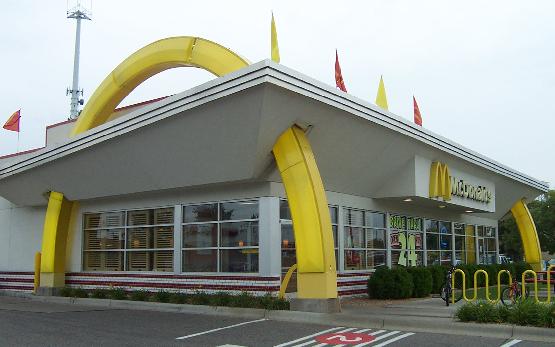
So, first up is McDonald’s. They started with a very cool design back when it was owned by the McDonald brothers, and decided to bring that back in their new restaurants to commemorate the 50th anniversary of the chain. What I like is the cool retro, Jetson’s Space Age kind of look to them. It makes me want to go in and buy a burger, even though I really want a Sourdough Jack..

McD_Bloomington_MN.JPG

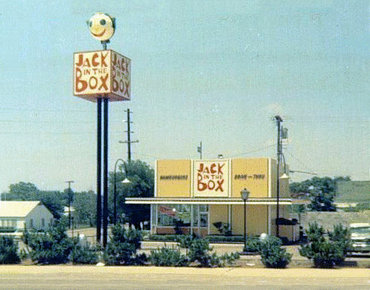
Anyone familiar with Jack in the Box that’s not over 30 (maybe 40?) years old knows their eateries to look kind of like this:

JackInBoxNewport

Jack in the Box needs to go old school I think in order to compete with McDonald’s. I really miss the actual sign that was a Jack in the Box…

jack-2

That’s my .02 cents. What do you think? In the meantime, I’m going to go grab both a Big Mac and a Jumbo Jack.